MRF Sales: 18 years of billing, moved to modern software.
MRF Trading Company, a printer-consumables wholesaler in Chattogram, ran its whole business on an Access application built for Windows XP. I replaced it with a Flutter app for the office PCs and the salesmen's phones, backed by an ASP.NET Core server that keeps every device in sync — and keeps working when the internet doesn't. The same server now runs an online shop whose orders turn into bills in the app. Every bill, payment and party balance from 2008 onwards moved across.
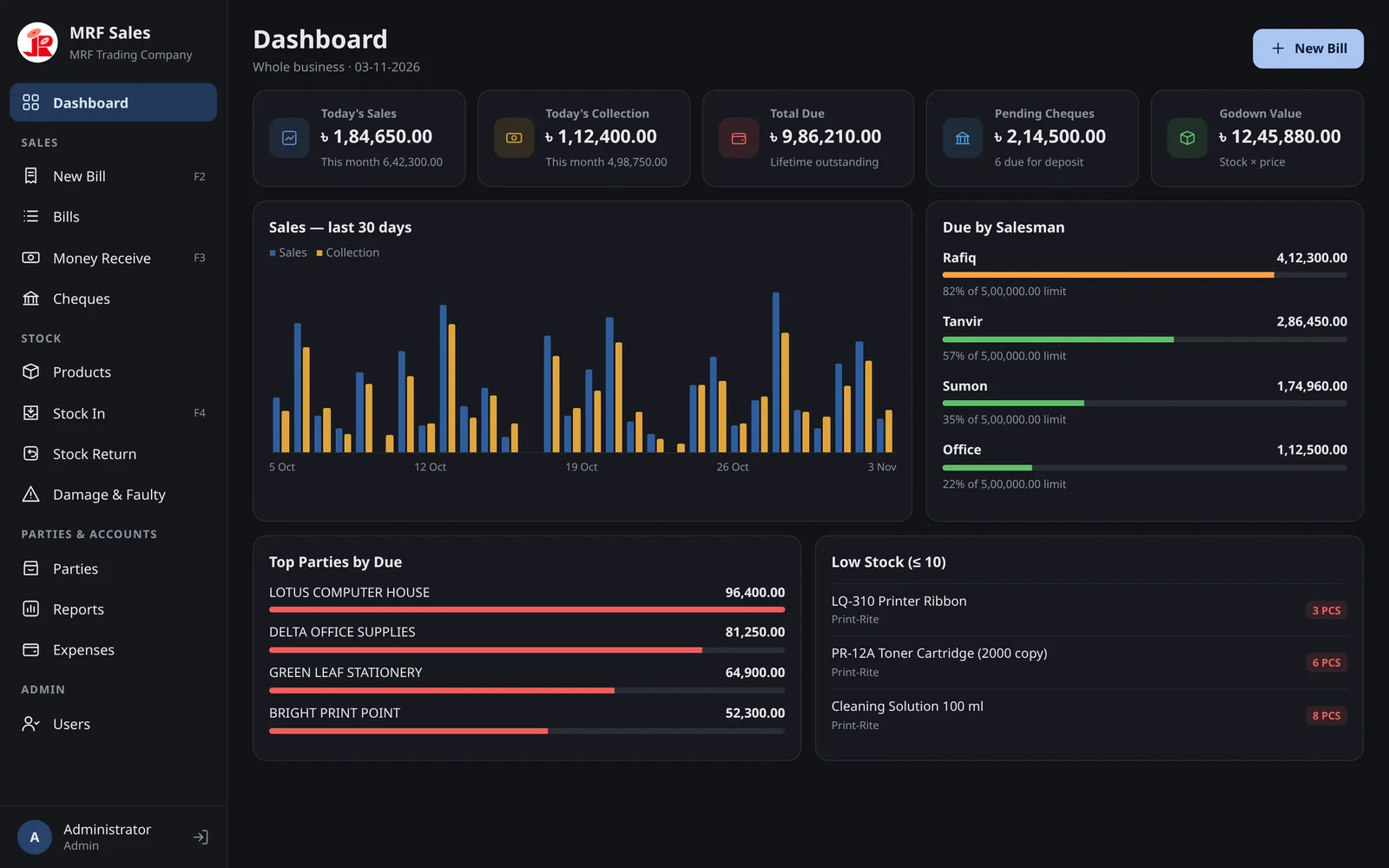
The old system worked — until it couldn't be trusted.
MRF imports and distributes Print-Rite and Just-Rite consumables — toner cartridges, refill ink, photocopier toner, ribbons, cleaning solution and toner powder — to hundreds of shops through a team of salesmen.
Built for Windows XP
An Access database from 2008, kept alive on old PCs. No updates, no support, and every year harder to keep running.
Nothing stopped mistakes
Minimum prices, salesmen's credit limits and who could change what were all honour-system. Any user could edit almost anything.
No answer to "who did this?"
When a price, a due or a date changed, there was no record of who did it or when — a real problem for the owner of a cash-and-cheque business.
The whole business, with the rules built in.
Every rule the owner described is enforced in the data layer and again on the server — so it holds no matter which screen, PC or phone is used.
Billing with price rules
Each line starts at the product price. Staff can sell higher, never lower; only admin can discount. Keyboard-first entry: F5 to pick an item, Enter to add it.
Salesman credit limits
"Sales By" is always the salesman who owns the party, for commission. Each salesman has a due limit; past it, the bill can only be saved fully paid.
Cheques & condition booking
Cash, cheque, bank transfer and courier "condition" payments. All stay pending until confirmed — bank transfers are verified by the admin against MRF's statement — so the due only drops when the money is real.
Stock, returns and faulty
Stock In with invoice and LC numbers and cost price; stock returns go back on the shelf, faulty items into separate faulty stock.
Bills and challans that match
A4 bill and delivery challan laid out to match MRF's existing printed bill, Bangla notes included. Print or save as PDF, before or after saving.
A dozen reports
Daily party payment, party ledger, sales register, due list, godown value, salesman and brand sales, purchase and expense registers — all printable, shrunk to fit whatever paper the printer has.
Audit trail for the owner
Bills, payments, stock in, price changes, due adjustments and voids are all recorded with who and when. Financial records are voided, never deleted.
Roles and permissions
Admin and staff, with a permission matrix. Staff can add products, parties and categories, raise prices and edit today's bills; lowering prices, discounts and voids are admin-only.
Built for old office PCs
Compact layout for 1366×768 and 720p monitors, paginated lists, a one-file Windows installer, backup and restore, English and Bangla.
Works offline, syncs everywhere
Each PC and phone keeps its own copy and bills with the same rules when the internet is down. Changes reach every other screen in under a second once it's back.
Salesman commission
Three terms a year, counted only on money actually collected, with returns deducted and per-salesman brand plans. Payouts are recorded per term.
A phone app with alerts
Salesmen bill from Android with bank-app-style fingerprint login. The owner gets push alerts for cheques to approve, staff bill edits, a clock set back or low stock.
Made for people who bill all day.
Dark by default, large type, and every frequent action reachable from the keyboard.
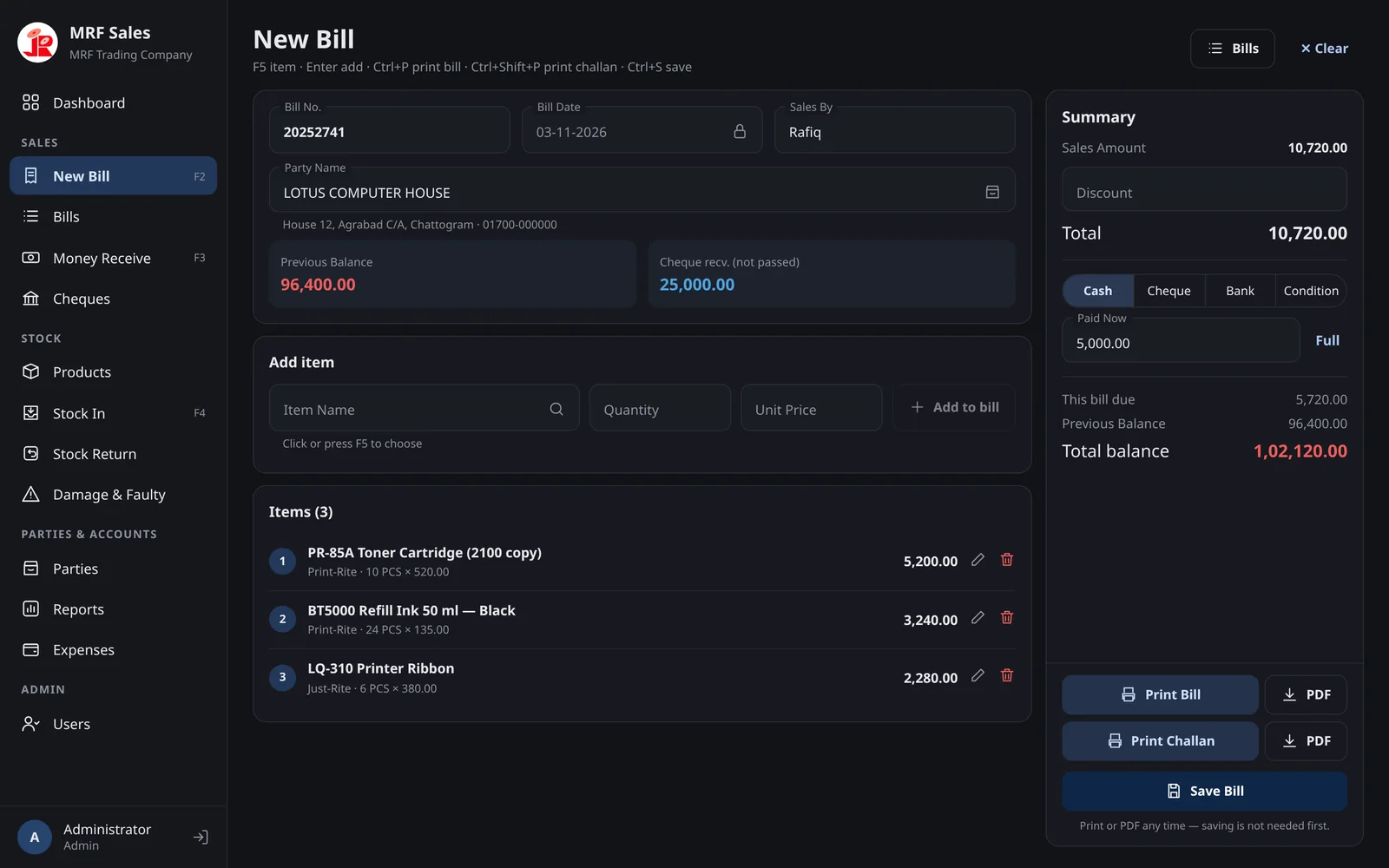
New Bill
Pick a party and the salesman, previous balance and pending cheques fill in. Items go in with F5 and Enter; the summary shows this bill's due and the party's total balance as you type.
- Bill date is locked to today
- Cash, cheque, bank or courier condition, with partial payment
- Print or PDF the bill or challan before saving, if the customer wants to check it
- Buttons stay pinned in view, even on a 720p screen
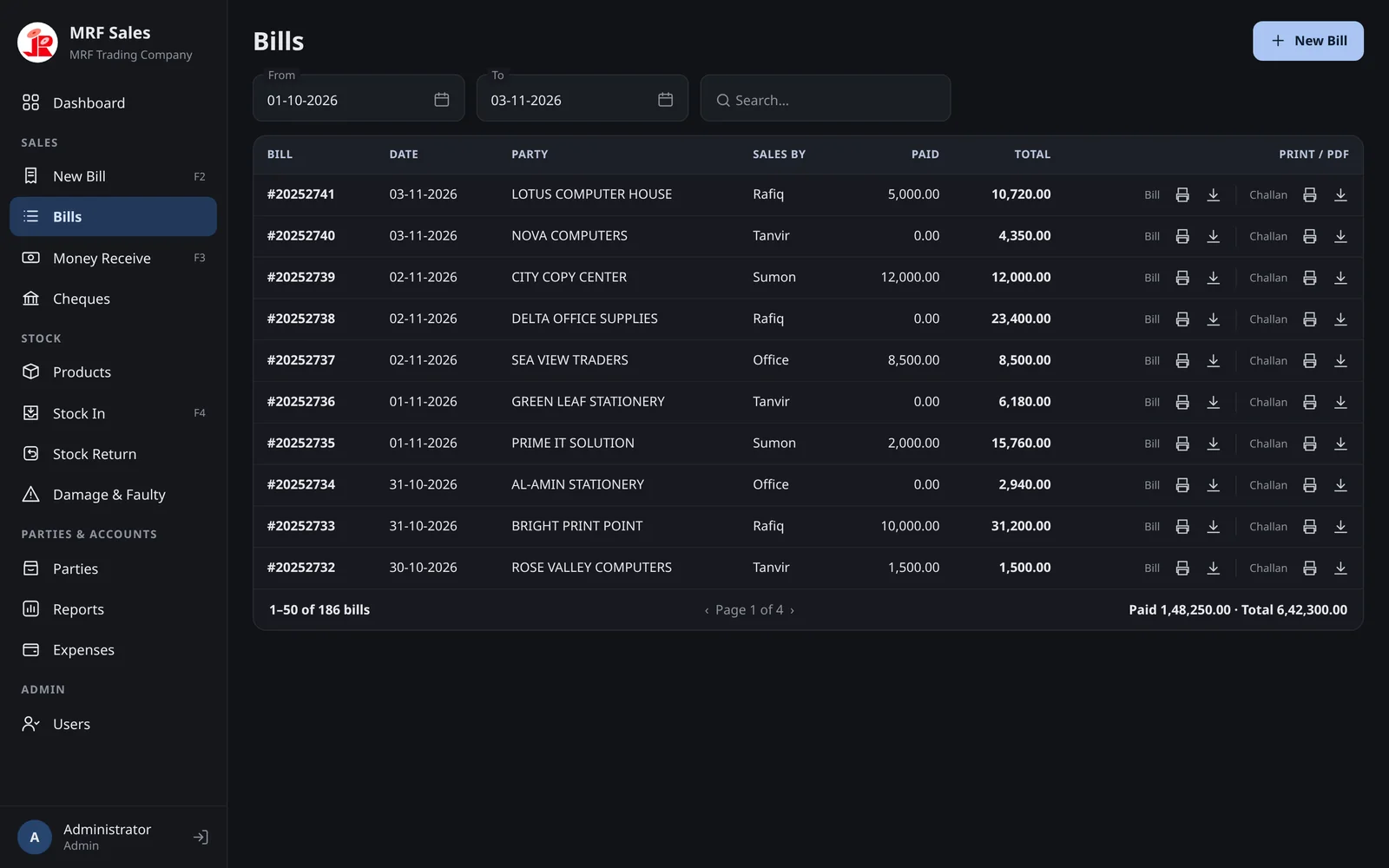
Bills
Any period, searched by party or bill number, fifty at a time — with totals for the whole period, not just the page.
- One click to print or download the bill or its challan
- Bill numbers in MRF's own format, continuing from the old system
- Voided bills stay visible, marked VOID, with the reason
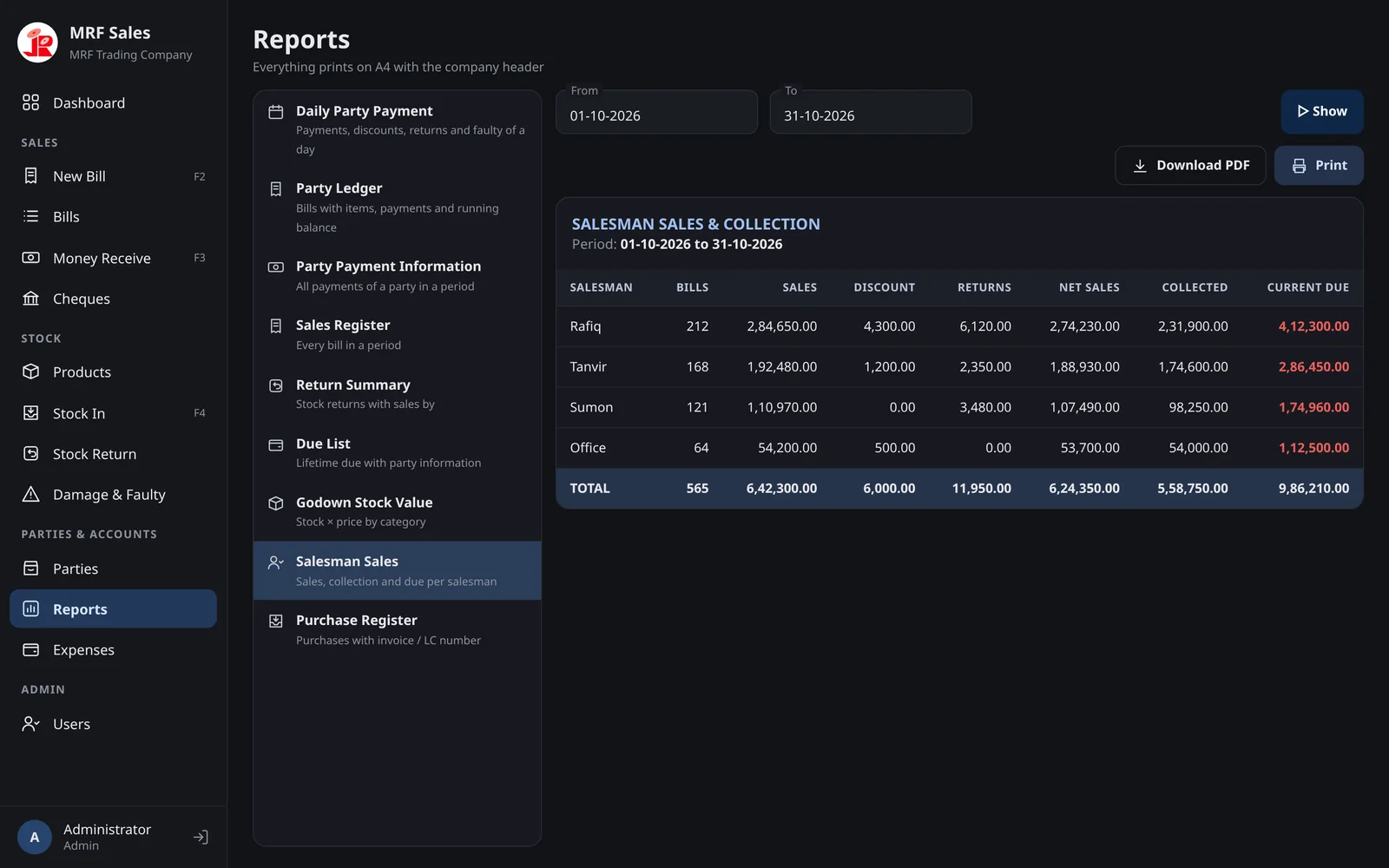
Reports
The reports the office already relied on, rebuilt from one ledger table so the numbers always agree with each other.
- Salesman sales and collection for commission
- Party ledger with running balance, back to 2008
- Everything prints on A4 with the company header
- Columns size to their figures — nothing cut off on small monitors
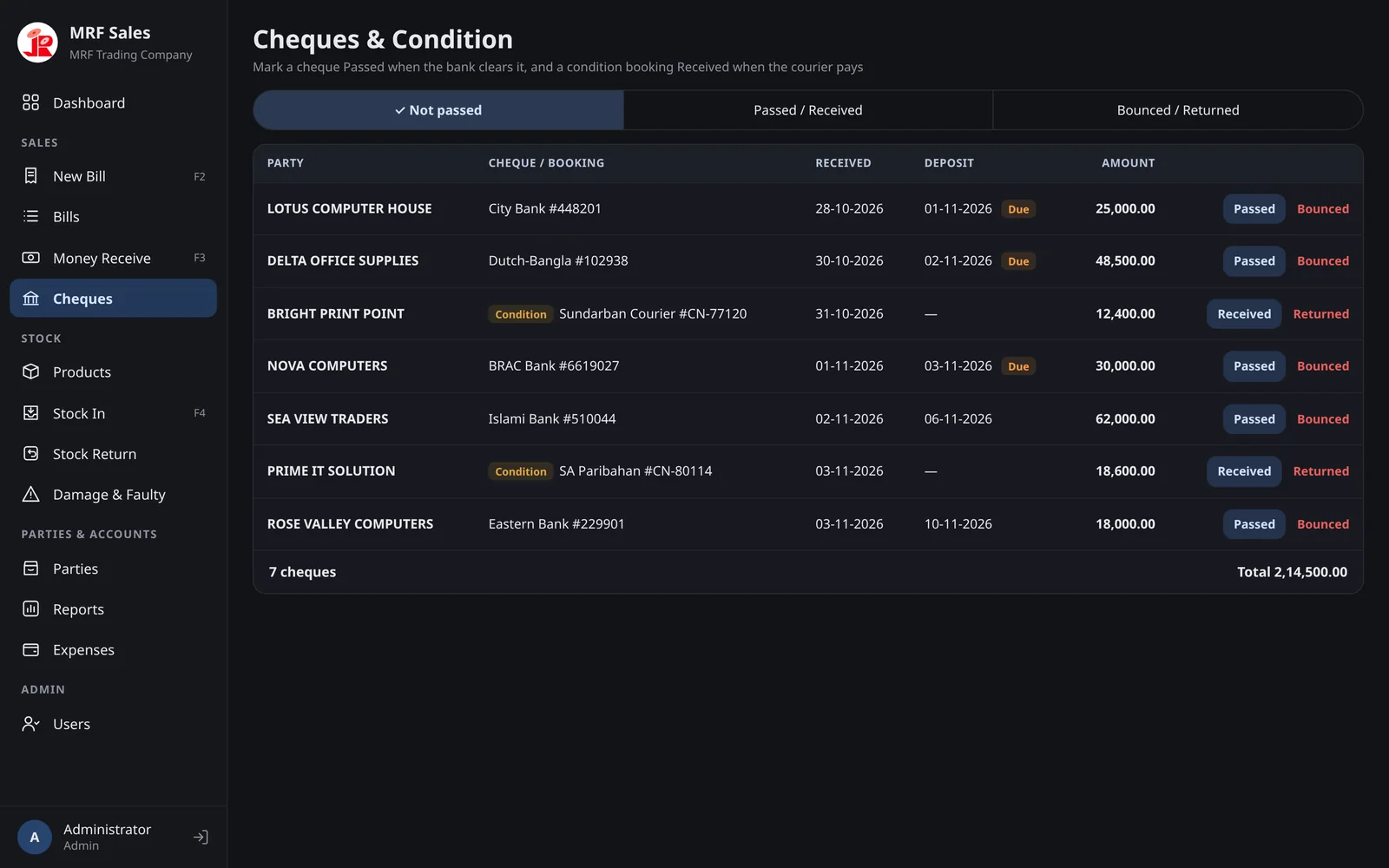
Cheques & condition
In this trade, a lot of money arrives as post-dated cheques or through couriers. Neither counts until it clears.
- Pending cheques and courier bookings in one list, oldest deposit first
- "Due" tag when the deposit date arrives
- Admin marks Passed / Received or Bounced / Returned — the party's due updates accordingly
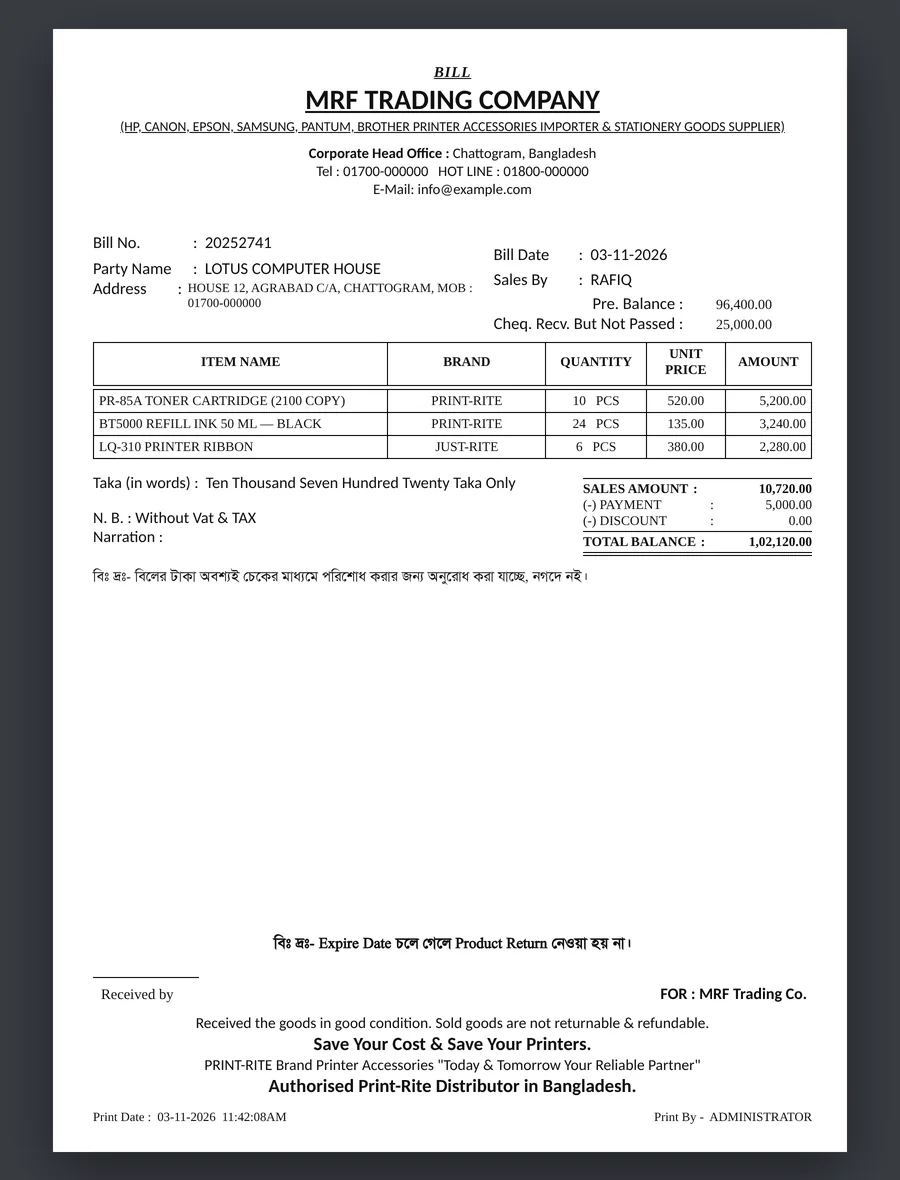
A bill customers already recognise
Shops have seen MRF's bill for years, so the new one keeps its layout: same header, same columns, same Bangla notes and footer — measured from a scan of the original.
- Bangla text in the Bornomala font, drawn as images because the PDF engine can't shape Bengali
- Amount in words, previous balance and cheques not yet passed
- A matching delivery challan without prices
Screens recreated with invented demo data. Company header shown with the client's permission; contact details replaced.
Eighteen years of data, moved without losing a taka.
A new system is only trusted if every party's balance on day one is exactly what it was in the old one. So the migration was treated as its own project.
Read the Access database directly
Exported every table from the old .mdb with mdbtools, then reverse-engineered how the old software actually calculated dues and stock — including the parts nobody remembered.
Clean up 18 years of history
Brand spellings normalised, duplicate party names split, phone numbers pulled out of address fields, orphaned rows from deleted items skipped, internal accounts left out.
Rebuild it on one ledger
Bills, payments, discounts, returns and adjustments became entries in a single ledger table, so every balance in the new app is one query — and can't drift.
Prove it with a reconciliation workbook
Every party's due compared old-vs-new in a spreadsheet for the owner. The only differences were cheques not yet cleared, which the new system rightly keeps pending.
Keep salesmen, limits and bill numbers
Salesmen became user accounts with their old credit limits and a forced password change; bill numbering continues from the last old bill.
One business, many devices, patchy internet.
The office PCs and the salesmen's phones now share one ASP.NET Core server with PostgreSQL. The connection isn't always there, so nothing waits for it: every device saves locally first and syncs when it can.
Save locally, queue the change
Every save goes into the device's SQLite copy and an outbox of operations — bill.create, payment.receive and so on — pushed in order when the connection returns.
Apply each change exactly once
Operations carry their own id, and every row they create gets a UUIDv5 derived from it. Sending the same change twice returns the saved answer instead of a duplicate bill.
Reserve numbers for offline work
Each device holds a block of bill and receipt numbers, so two salesmen billing offline never print the same bill number.
Accept, then flag
An offline bill that oversells stock or passes a due limit is still saved — the sale happened — and listed under Sync problems for the owner. Permission breaks are refused.
Push the news
After each write the server sends a SignalR "changed" signal and every device pulls just what's new. Without the socket it falls back to polling.
Selling direct to shops, from the same server.
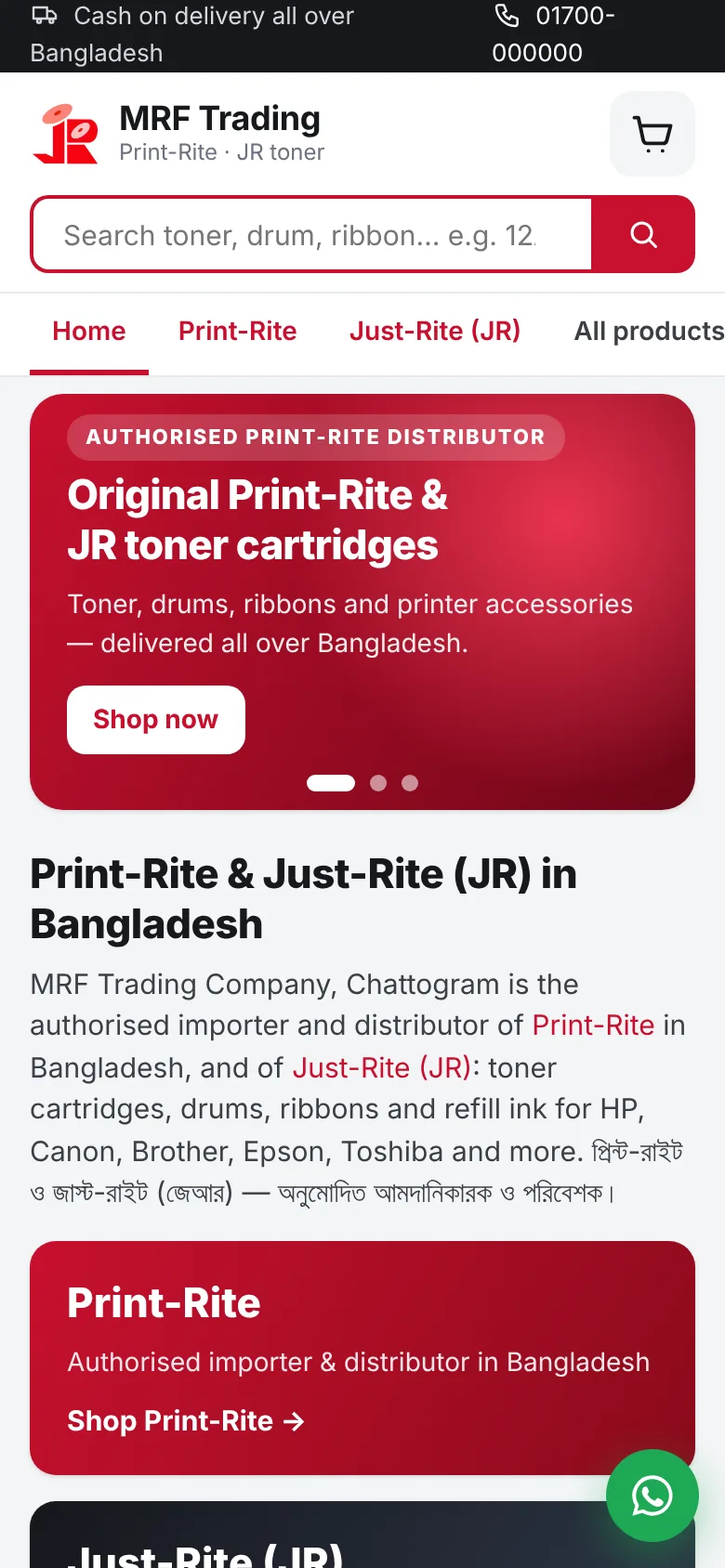
MRF sells to businesses through salesmen. The online shop lets any shop or office in Bangladesh order Print-Rite and JR supplies directly — and every order lands in the same app the office already bills from. No second system, no copying orders by hand.
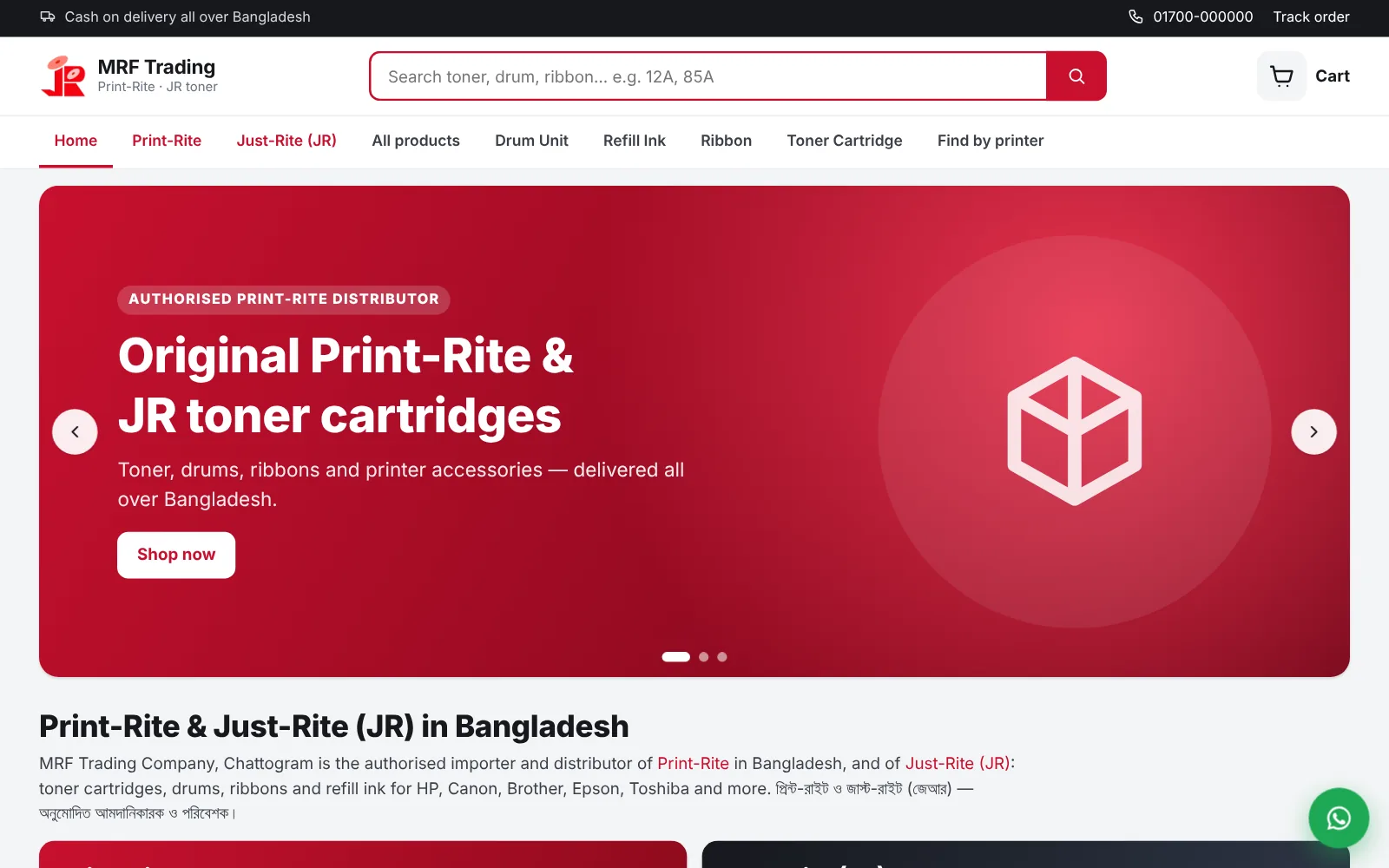
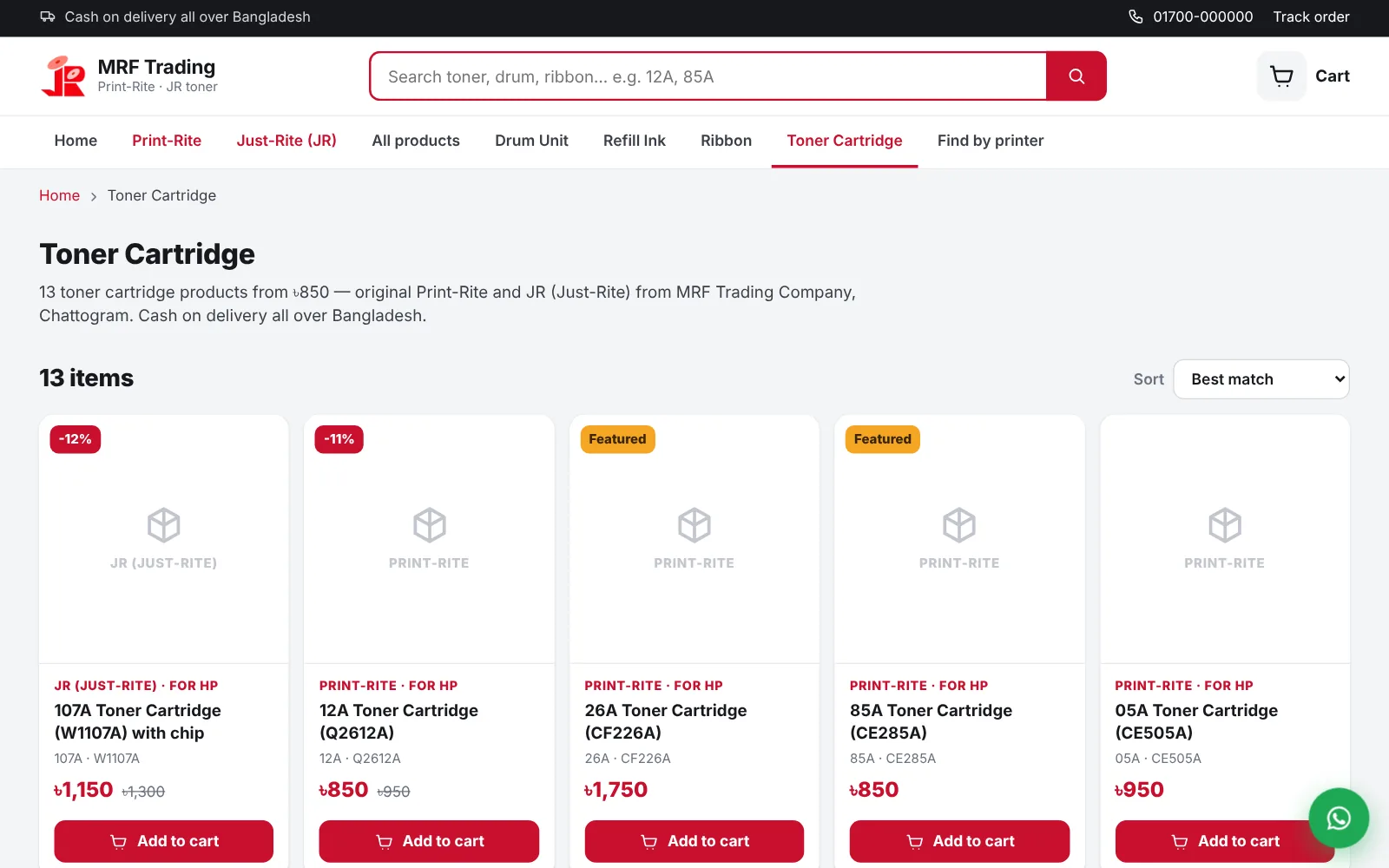
A storefront that knows toner
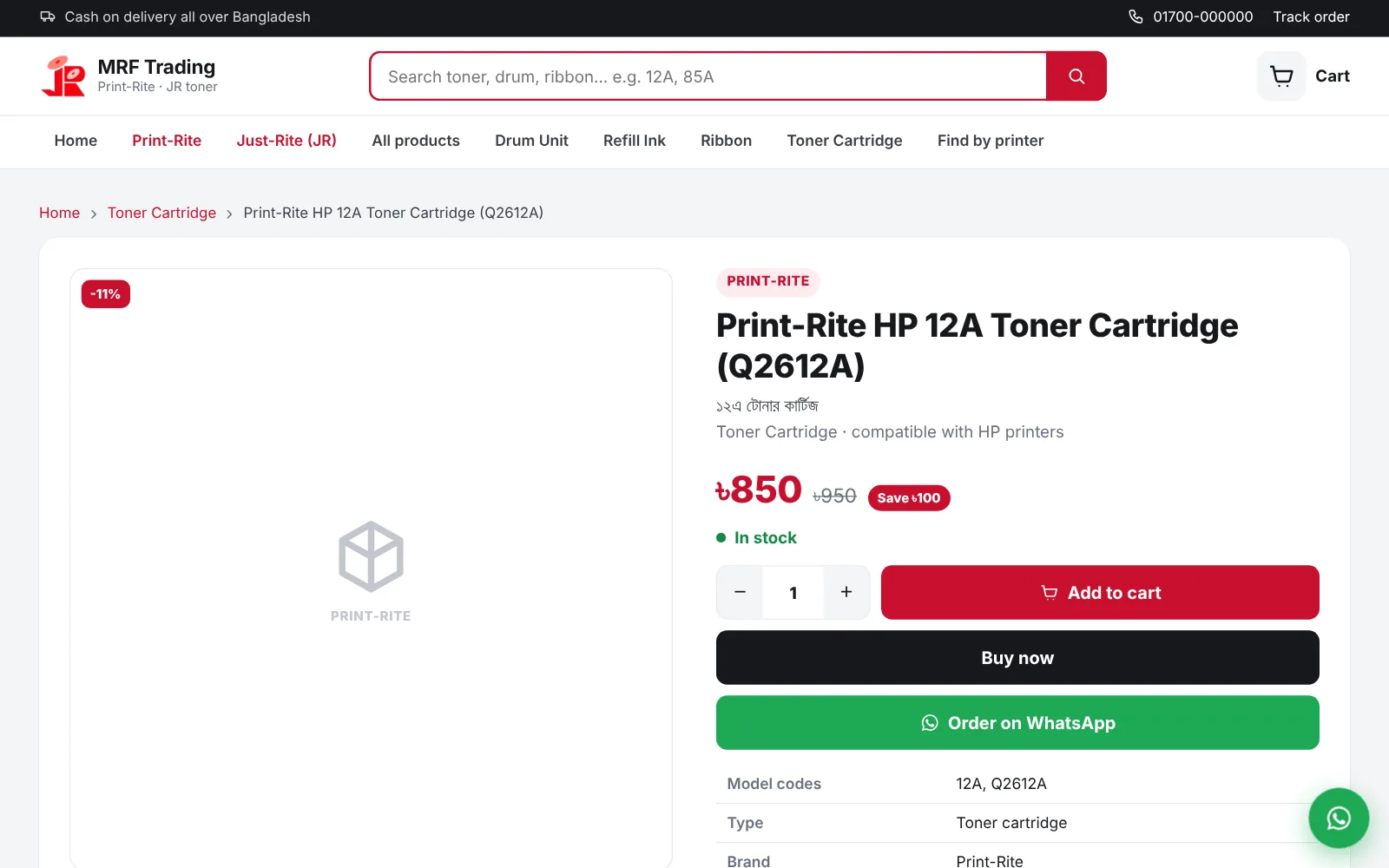
People search for "12A" or "Q2612A", not product names, so every product carries its model codes, the printers it fits and a Bangla name.
- Pages for each category, brand, printer maker and printer model
- Sale prices, featured products and home-page banners, all set from the app
- Website prices are separate — wholesale prices are never shown
- Server-rendered Razor Pages: fast on slow mobile connections
Orders become bills, not emails
Checkout takes a name, mobile number, address and delivery area — cash on delivery or a payment QR. Then the order flows straight into the office's workflow.
- The owner's phone gets a push alert for every order
- Confirm, then Make bill: it finds or creates the customer's party and fills New Bill
- Open orders hold their stock until the bill is made
- QR payments are verified by the admin against the statement
- Customers can order on WhatsApp or track their order online
Built to be found
A shop nobody finds is a cost. Search was designed in from the start, for Google and for AI assistants.
- Structured data, a full sitemap and buying guides written in the app
- A Google Merchant feed for free Shopping listings
llms.txtand a robots file that welcomes AI crawlers- Searches that find nothing are logged, so the owner knows what to stock
- Bulk-edit every product's website fields in Excel and import them back
Shop screens from a test server with sample products and demo contact details. Product photos are added in the app.
Decisions that keep the numbers honest.
Money in integer paisa
No floating-point rounding anywhere. Amounts are stored and summed as whole paisa and only formatted with the lakh-style grouping at the edge.
One ledger, never edited
Balances are SUM(debit − credit) over one table. Corrections are new adjustment entries; voids reverse stock and balance but keep the original visible.
Rules live in repositories
Permissions, minimum prices, due limits and locked dates are checked in the repository layer, behind a permission matrix — the UI only mirrors them for instant feedback.
Backend-ready from day one
Screens talk only to repositories through Riverpod providers, so the ASP.NET Core API slotted in by swapping implementations — the same rules, now enforced on the server too.
The server owns the date
Bills, payments, returns and stock in are dated today in Bangladesh time by the server, never by the device. A PC clock set back is refused and reported to the owner.
Fast on 18 years of rows
Paginated lists with totals from separate aggregate queries, and covering indexes for balances — the party list went from ~85 ms to ~15 ms.
Shipped like a product
Versioned schema migrations, a one-file Inno Setup installer that upgrades in place and keeps data, and staged database restore that never overwrites a file in use.
Tested and released by CI
Rule, auth, sync and HTTP tests run on every push; a version tag builds the Windows installer and the Android APK and publishes a release. The server runs in Docker behind Caddy for HTTPS.
From the office to the customer.
The server, sync, phone app and online shop are built; the office is moving onto them now, with nightly backups on the server. Next is launching the shop on its own domain — Search Console, Google Shopping and a Business Profile for the Chattogram office — and adding real product photos.
Running your business on old software?
I build custom billing, stock and ledger systems for shops and distributors — including moving your old data across, intact. Tell me how your business works and I'll tell you what it would take.